


External Lab Tests: Submitting Samples Outside the Clinic
The External Test page tracks lab work that’s sent to outside facilities — pathology slides, blood biochemistry, PCR, and any other test the clinic can’t run in-house. Use it to record what was sampled, track the submission lifecycle from shipping to owner notification, and edit values once the lab returns its report.
How to access
- From the main menu, click Tests.
- Click External.
- Filter the list by Category, Time period, Service type, Test status, or Pet medical record number.
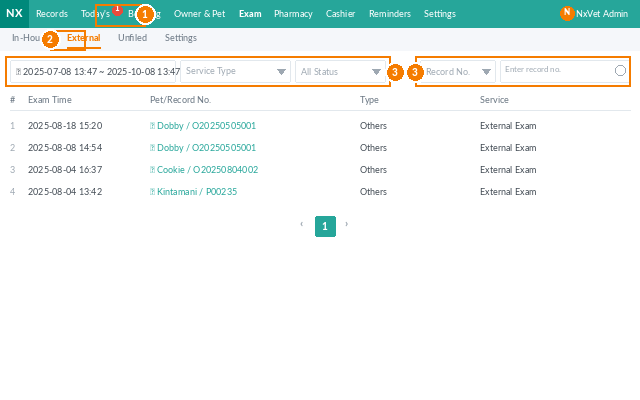
What each row tells you
- Test time — when the test record was created in NxVet.
- Pet / medical record number — jump straight to the patient.
- Category & service — what kind of external test.
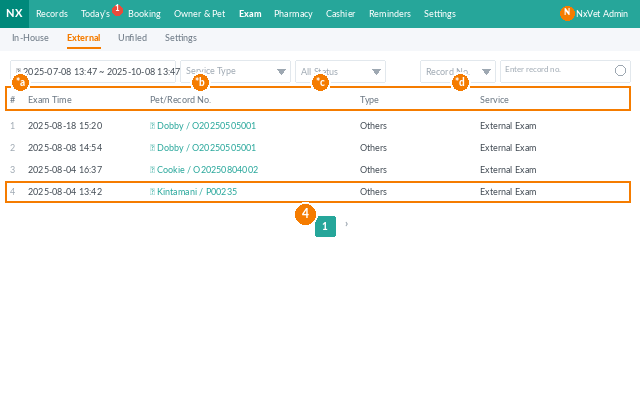
Recording sampling details
Click any row to open the edit page. Under Sampling, fill in:
- Sampling date — when the sample was actually collected from the patient.
- Sampling site — which body part or location.
- Sample type — blood, feces, hair, tissue, etc.
Progress tracking
Track each handoff in the test lifecycle so reception always knows what to tell the owner:
- Shipping date — sample sent to the lab.
- Phone notification — lab called with preliminary results.
- Document received — written report received at the clinic.
- Owner notification — owner has been informed.
Editing test values
- Click the test row to open the edit page.
- Set or update the Responsible personnel.
- Enter Test results; the min/max reference values are displayed alongside each item.
- Attach the lab report:
- Click + to upload from your computer.
- Click the camera icon to take a photo or upload from a phone.
- Click the pencil icon on any image to caption it.
- Write findings in Recommendations.
- Click Save to keep editing or Submit to push values back into the pet’s medical record.
Tip
Always update Owner notification the moment you call the client — even before you fully edit the values. Reception staff scanning the test list see at a glance who still needs to be called back, so nobody falls through the cracks.